
The Project
Why is UC Merced migrating to Drupal 11?
Drupal 7 reached its end of life and no longer receives standard security updates or long-term support. Migrating to Drupal 11 provides a modern, supported platform that improves security, accessibility, performance, and long-term sustainability for the university’s web presence.
Why is this a migration instead of an upgrade?
Drupal 11 is built on a fundamentally different architecture than Drupal 7. Because of these changes, websites cannot simply be upgraded in place. Instead, websites are recreated on the new platform, existing content is migrated, and site owners have the opportunity to review and validate their websites before launch.
Why was my website selected as a Priority site?
Priority websites were identified based on factors such as visibility, usage, and their role in supporting students, faculty, staff, and visitors. Migrating these sites first allows OIT to modernize the university’s highest-impact web properties while refining the migration process before expanding to additional websites.
My website isn’t listed as Priority. What should I do?
The preparation steps apply to every website, regardless of migration order. Cleaning up content, reviewing website access, and planning for the transition away from Drupal Webforms will make future migrations smoother and reduce work later.
Preparing Your Site
Why should I clean up my website before migration?
Migration is an opportunity to improve the quality of your website—not simply move existing content.
Every page that is migrated is an opportunity to ask whether it should continue to exist, whether it is still accurate, and whether it remains the best source of truth for that information. Removing outdated or unnecessary content reduces the amount of material that must be migrated and validated while improving the overall quality of the university’s digital information.
Why should I review website access?
Website access should reflect current stewardship. Before migration, review the users who can manage your website, remove anyone who no longer requires access, and verify that current website stewards have the permissions they need.
Why are Drupal Webforms going away?
Drupal Webforms cannot be supported in UC Merced’s Drupal 11 implementation. Microsoft Forms provides improved security, easier management, and a more sustainable solution for most campus use cases.
Can I continue using my existing Drupal Webforms until my migration?
Yes. Existing forms will continue functioning in Drupal 7 until your website migrates. However, OIT strongly encourages site owners to begin recreating forms in Microsoft Forms during the Preparation phase to avoid delaying their migration. For additional support, we recommend reading through Microsoft's support documentation on Forms.
Why should departmental forms use a service account?
If you’ve already created forms using your personal account, ownership can be transferred to a service account later. Contact your department’s Chief Administrative Officer (CAO) if you need assistance establishing a service account.
Can I use the same url as the old forms?
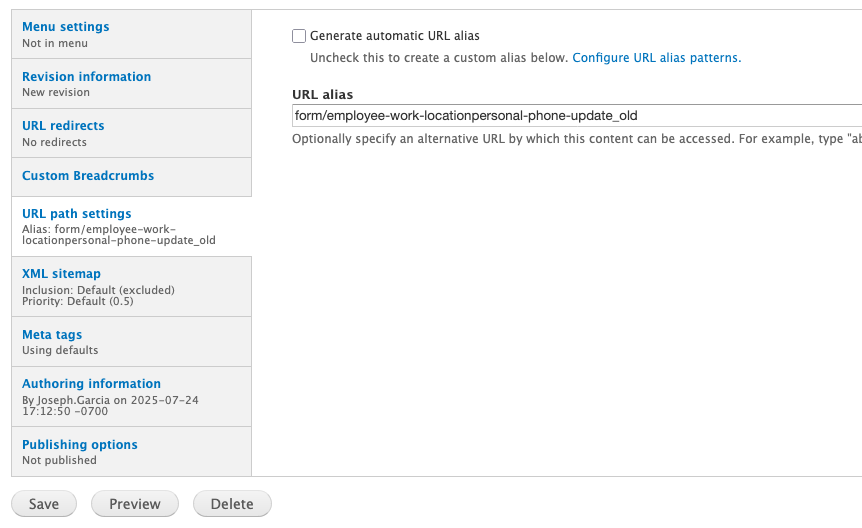
The embedded form does not fill the whole page. Is there a way to change it's size?
Example generated embed code:
<div style="left: 0; width: 100%; height: 800px; position: relative;"><iframe src="https://it.ucmerced.edu/%3Ca%20href%3D"https://forms.cloud.microsoft/Pages/ResponsePage.aspx?id=o-nf9HjKmEm3p-bQaS6s5hU71GScqz9Ku9PqSFuVmNpUNUhVWDBUMFpDODgyUExQNDdTS0hJRlBaWC4u&embed=true"">https://forms.cloud.microsoft/Pages/ResponsePage.aspx?id=o-nf9HjKmEm3p-b... style="top: 0; left: 0; width: 100%; height: 100%; position: absolute; border: 0;" allowfullscreen allow="fullscreen *;"></iframe></div>
The Migration Process
Will my website look different?
Most websites will retain their overall branding and information architecture while benefiting from a modernized editing experience and updated platform capabilities. Additional previews of themes and features will be shared throughout the project.
Will I need training?
Yes. Although Drupal 11 is more intuitive than Drupal 7, it introduces a new editing experience and updated workflows. OIT will provide webinars, documentation, and training resources to help website owners prepare.
Will all website features migrate?
Most standard content will migrate. Some legacy features—most notably Drupal Webforms—will not. OIT will provide guidance for any functionality requiring alternative solutions.
Drupal 11
Will my website look different?
Most websites will retain their overall branding and information architecture while benefiting from a modernized editing experience and updated platform capabilities. Additional previews of themes and features will be shared throughout the project.
Will I need training?
Yes. Although Drupal 11 is more intuitive than Drupal 7, it introduces a new editing experience and updated workflows. OIT will provide webinars, documentation, and training resources to help website owners prepare.
Will all website features migrate?
Most standard content will migrate. Some legacy features—most notably Drupal Webforms—will not. OIT will provide guidance for any functionality requiring alternative solutions.
Looking Ahead
Why does content quality matter?
Maintaining accurate, current, and well-organized content helps ensure that anyone seeking information—whether browsing a webpage directly or using emerging technologies—receives trustworthy answers.
How long will this project take?
Priority website migrations are expected to begin in early fall 2026, with additional migration groups following in phases. Project timelines will be updated as work progresses.


